Divers 2000 series CX-1 Dreamcast

September 9th, 2009

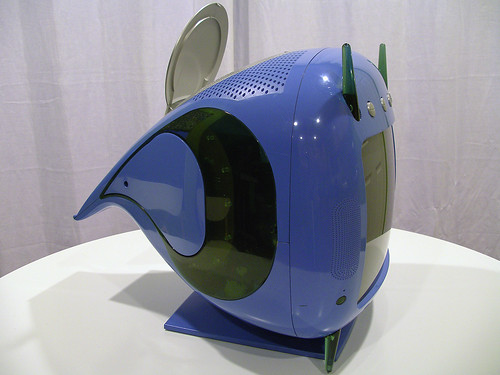
Here’s the Divers 2000 series CX-1 Dreamcast, a rare all-in-one console unit developed by Fuji, intended as a video communications and gaming device for the consumer and hospitality markets. Released just one year before production of the entire Dreamcast platform ceased, the CX-1 was unique, short-lived, and expensive, selling for over four times the 19,900¥ price of the standard Dreamcast console at the time.

Highly sought after by collectors, the Morolian-iMac hybrids are generally difficult to find, although several years ago, Rklok, a reseller in the Netherlands, managed to acquire a fair number of new-in-box units and he’s been trickling them out ever since, so they aren’t quite as rare outside of Japan as they once were. Expect to pay around $600-800 (hey, less than original retail!) for a boxed and complete Divers.

If you’re patient, and don’t mind either incomplete or slightly abused merchandise, the occasional deal can be had; it just may take a year or two of waiting before it happens.

Full story, after the jump »

Madonnas come home.

June 21st, 2009

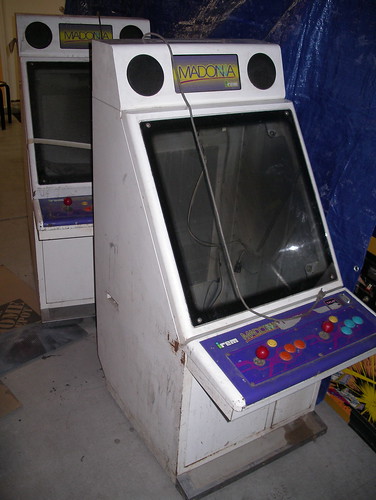
Picked these up locally today: two Irem Madonnas, Japanese candy cabs from the late 1980s. They look to be in fairly rough shape, but neither is dented or damaged, so they should be one of the easier restoration projects on deck.

Irem Madonnas - Front

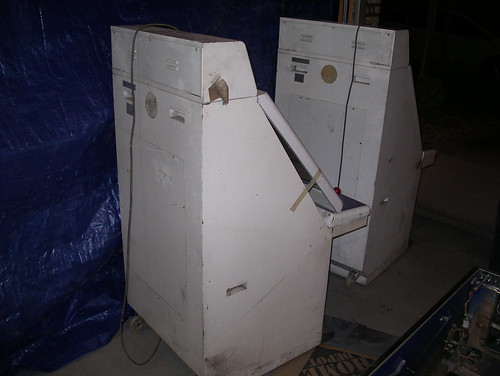
Irem Madonnas - Back

Compared to other candy cabs, there’s relatively little information about these online. Guess not too many of em made it over to the States. Next step is tracking down a couple decent 25in monitors.

Replacing the battery in an Oral-B Pulsar.

May 24th, 2009

I like the Oral-B Pulsar, it’s a fine enough toothbrush, but half the time the battery runs dead well before the bristles are worn. Rather than using bristle wear as an indicator, I’m sure most folks just toss the brush as soon as the battery is dead and move on to a new one. Throw in the occasional dud battery that only lasts a week or two and brushing your teeth with a Pulsar can end up costing more than a Netflix subscription.

That’s annoying and expensive, and while moving to a new type of toothbrush may be the more practical answer, it’s not nearly as fun.

The internet says that a toothbrush should be replaced every three months, assuming you don’t go to town on your teeth and destroy the bristles early. That’s way longer than a typical Pulsar battery lasts, so what we want to do is replace the battery inside with a rechargeable that’ll last much longer.

First, you’ll need to crack open the toothbrush. While the lower half of the brush does screw off, it’s glued on with an adhesive, so tools will help here.

Once the adhesive is popped, the cap will twist right off.

Carefully bend back the metal prong, and remove the (ahah!) AAA battery.

The Pulsar battery is a somewhat funky Duracell, with a protruding bump on the negative end. My replacement battery (a rechargeable Hybrio, go with those or a Sanyo Eneloop) is completely flat and wouldn’t always make contact with the inner terminal, so I recommend flipping the orientation and tossing in your replacement battery positive side first. Note the shape difference:

The on/off mechanism in the Pulsar is very basic: the Off button simply pushes a bit of plastic between a split inner terminal, breaking the circuit. The problem here is that the pressure on the terminals needs to be just right, too much and the toothbrush won’t ever turn off, too light and it won’t turn on. I experimented with adding washers and tweaking the prong, but the most successful method ending up being the simplest.

Discard the bit of foam at the top of the prong and replace it with a folded piece of electrical tape. Pinch the prong against the tape with pliers to secure the padding, and screw on the cap (mine aligned label side up).

Test it a few times, and once you’re satisfied that the fit is good, go celebrate the financial savings by turning your Blu-Ray access back on at Netflix.

Not sure I’d want this on a tree, but…

May 12th, 2009

Hallmark's 2009 Star Trek Keepsake

…I am so buying one of these this year.

Howto: Add new art to your Madcatz Fightstick.

February 27th, 2009

Rez Madcatz Fightstick

So, you’ve got your fancy new Madcatz Street Fighter IV Standard Fightstick (either because the Tournament Edition was sold out, or you’re the tinkering or budget-minded sort), and now you want to customize it a bit, maybe add a bit of your own spirit and identity, to help your eighty dollar joystick show that you too are a unique and individual flower.

The first thing you’ll want to do, even if you don’t really give a damn about the whole unique and individual thing, is replace the buttons. The stock Madcatz buttons are lousy (there’s a reason it’s $70 cheaper than the TE stick), and new Sanwa or Semitsu buttons are only a couple buck apiece. If you’re especially inclined, you can also replace the entire stick, or simply swap out the balltop or restrictor gate. I’m not gonna go into the hardware modding here, SRK forum member Sileighty’s Fightstick modding FAQ does an excellent job of giving you the info you’ll need for that stuff.

On to the art.

preparation.

What you’re gonna need:

  • A straight edge
  • Hobby knives – these are essential, and cheap. That three pack in the picture was fifteen bucks at the local hobby store.
  • Small Phillips screwdriver
  • A spudger. I’ve raved about spudgers before, but I’ll say it again. If you do any sort of screwing around with plastic hardware, get one of these.
  • Hopefully not a jury summons like I have in the photo above. Stupid civic duty.
  • Your replacement art. I’ll talk about that next.

Full story, after the jump »

link love 11-27-08

November 27th, 2008

Getting a post in before everyone comes over edition.

The ever-erudite Insomnia reviews SpaceWar!, an early multiplayer PDP-1 game, and one of the first true video games.


Black Friday sales games that you should really consider purchasing:

Happy Thanksgiving, all.

2009 Arcade Restoration Agenda.

November 12th, 2008

I, Robot – Ground up restoration. Un-Choplifter this thing and bring it back to its former glory. So far I’ve found non-working pcbs, the pcb cage, and a hall effect stick. Still need a harness, marquee and bezel art, and ideally a new control panel.

Interstellar Laser Fantasy – Cabinet is in fairly nice shape, should only require some touch up work here and there once the control panel is rebuilt. No player or disc, so the current plan is to make it into a dedicated Daphne machine (anyone need Interstellar boards?).

Xevious – Cabinet is in solid shape, and with the spare cp, this one might end up being one I play with and turn into a MAME or multi-game. Also, I’m toying with the idea of mounting the upper artwork (directly below the marquee) to plexi with a soft backlight.

Missile Command – Ground-up restoration. Gonna be a lot of work, but at least the cabinet itself is in solid shape.

Omega Race – Ground-up restoration. Front art is all in great shape, side art needs replacing (awaiting thisoldgame.com repros), back of the cabinet looks like it was dragged down a gravel road, will need a bit of bondo work. Hoping the boards are good, still needs a G05 chassis and a few other bits.

The wife is right, I do not need any more machines right now. I’ve got enough cabinet projects to last me a full year, so unless someone wants to donate an upright Discs of Tron, I doubt I’ll be picking up anything new. It’s still fun to scan craigslist in the morning with coffee, though.

So, with the recent spate of arcade project posts, have I managed to convince any of you out there to take up this life leeching incredibly fulfilling hobby? Got a 2009 restoration (or collection) agenda?

Craft Day for the arcade cabinet owner.

October 24th, 2008

1) Buy a handful of acrylic photo keychains. I went with the Lifestyles Photo Keytags that Walgreens sells, two for three bucks.

2) Download flyers for your cabinet. The Arcade Flyer Archive is a perfect resource, and you’ll want to find two good pages, for both the front and back sides of the keychain.

3) Clean up and resize the artwork. Some of the scans can be pretty rough, so if you’ve got the knowhow, now is the part where you’ll want to do any color correction and blemish removal from the flyer artwork, otherwise don’t worry about it, they’ll turn out fine enough. Once everything looks good, size ‘em down. If you’re using the Walgreens keytags, you’ll want the print size to be 2×2.875 inches.

4) Create a printing template. If you have Photoshop, feel free to use the one I made, formatted roughly to size and for 4×6 glossy photo paper.

5) Print your artwork. Let your printouts dry for a bit, then trim as needed. Place the front and back flyer images in the keytag, snap in the acrylic cover, loop in your cabinet keys and you’re good to go!

Arcade flyer keychains

Neo-Geo MVS-2-13 restoration

October 23rd, 2008

The lack of free space in the garage aside, I’m really enjoying the whole arcade restoration thing. This hobby strikes so many of the right nerves for me: the strong nostalgia kick, the tinkering, the collectibility, and the research and skill acquisition required to go from start to completion.

If you were a gamer in the 80s and if you’ve got the room, I recommend taking on your own project — thanks to the current state of our economy, cabinets are selling for cheap, and with a bit of exploration and patience you could easily wind up with your own personal gaming holy grail sitting in your workspace. There are plenty of small shops out there selling parts and reproduction artwork, and many active online communities to help with the hunt for specific pieces and technical questions.

Anyway, on to the latest.

A Neo-Geo MVS-2-13 – more commonly known as a Neo Mini or Cabaret – was one of my personal picks from the warehouse raid a few weeks back, and my first project from the lot.

Neo mini

Full story, after the jump »

Arcade Trailer Raid, Day 2.

September 25th, 2008

It begins.

Here’s where the bulk of the games were located. The facility is one of those places on the edge of town where they rent out shipping containers and trailers; the containers were stacked everywhere, with trailers lined up behind them. Looked like a level out of Rainbow Six or something. Every now and then, F-15s and F-16s from Nellis would scream right over us, close enough to read the numbers.

I wasn’t forward-thinking enough to bring sunscreen, but thankfully the worst of the summer heat had already passed; the temperature was a comparably balmy mid-90 degrees or so.

Okay, pictures!

Thank God for the forklift.

Ray takes a ride while the seller drives. Loose gravel added excitement to the day, as every now and then the forklift would spin out or get stuck, scaring the hell out of whoever was stabilizing the load.

There was a nice selection of laser disc games, all in decent shape. M.A.C.H. 3, an upright and cockpit Interstellar Laser Fantasy, and an Astron Belt cockpit. Additionally, we pulled out an upright and cockpit Firefox, both of which the seller unfortunately kept.

Two Star Trek cockpits. One went to Pete, one back home with Ray. Behind em to the left is the Firefox cockpit.

Here’s the upright Interstellar, and the only cabinet I personally claimed from the day.

Mappys! Adam Isgreen is now the proud owner of the one on the right.

Two Turket Shoots. What a strange collection of games in this trailer.

Ray poses with the loot.

And finally…

That’s not a farmer’s tan, that’s dirt.

Okay you can stop checking out my feet now. Here’s the final tally:

Games I’m keeping
I, Robot (Choplifter converted)
Interstellar Laser Fantasy
Xevious
Neo Geo MVS-2-13 cabaret & a 6slot mobo

Games I’m cleaning up to sell
Zombie Raid
Paperboy
Super Monaco GP
Nintendo VS Dualsystem upright (Super Mario & Dr. Mario)