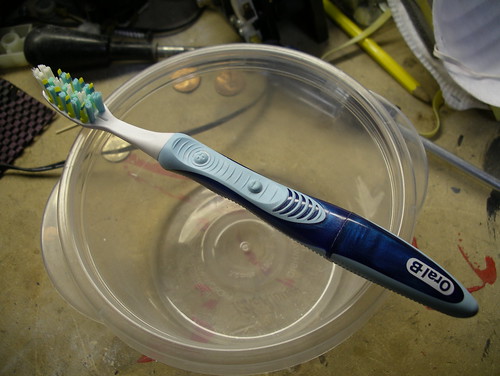
I like the Oral-B Pulsar, it’s a fine enough toothbrush, but half the time the battery runs dead well before the bristles are worn. Rather than using bristle wear as an indicator, I’m sure most folks just toss the brush as soon as the battery is dead and move on to a new one. Throw in the occasional dud battery that only lasts a week or two and brushing your teeth with a Pulsar can end up costing more than a Netflix subscription.
That’s annoying and expensive, and while moving to a new type of toothbrush may be the more practical answer, it’s not nearly as fun.
The internet says that a toothbrush should be replaced every three months, assuming you don’t go to town on your teeth and destroy the bristles early. That’s way longer than a typical Pulsar battery lasts, so what we want to do is replace the battery inside with a rechargeable that’ll last much longer.
First, you’ll need to crack open the toothbrush. While the lower half of the brush does screw off, it’s glued on with an adhesive, so tools will help here.

Once the adhesive is popped, the cap will twist right off.

Carefully bend back the metal prong, and remove the (ahah!) AAA battery.
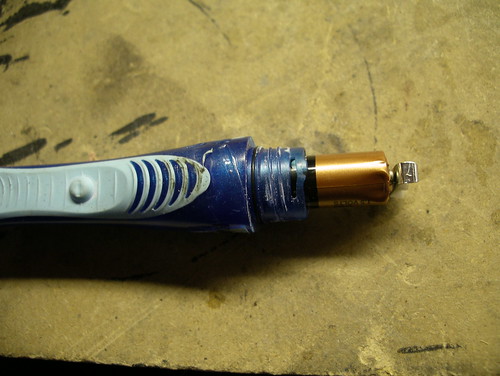
The Pulsar battery is a somewhat funky Duracell, with a protruding bump on the negative end. My replacement battery (a rechargeable Hybrio, go with those or a Sanyo Eneloop) is completely flat and wouldn’t always make contact with the inner terminal, so I recommend flipping the orientation and tossing in your replacement battery positive side first. Note the shape difference:
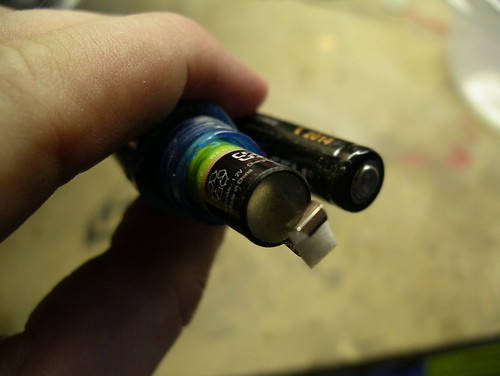
The on/off mechanism in the Pulsar is very basic: the Off button simply pushes a bit of plastic between a split inner terminal, breaking the circuit. The problem here is that the pressure on the terminals needs to be just right, too much and the toothbrush won’t ever turn off, too light and it won’t turn on. I experimented with adding washers and tweaking the prong, but the most successful method ending up being the simplest.
Discard the bit of foam at the top of the prong and replace it with a folded piece of electrical tape. Pinch the prong against the tape with pliers to secure the padding, and screw on the cap (mine aligned label side up).

Test it a few times, and once you’re satisfied that the fit is good, go celebrate the financial savings by turning your Blu-Ray access back on at Netflix.
When I see this, I think of Gremlins, you are the next Rand Peltzer (Billy’s Father) if you continue down this path…
From the movie “Gremlinsâ€â€”
I’m an inventor. I made this.
The Bathroom Buddy.
The invention of the century.
It eliminates the need to carry
heavy luggage when you travel.
You got yourself
your shaving mirror…
…your toothbrush, a toothpick.
You got toenail clippers…
…a nail file…
…and you got yourself
a dental mirror.
This is gonna revolutionize traveling.
Let’s just say,
for the sake of argument…
…that you’re on a bus,
a plane or a train.
You forgot to brush your teeth.
You got yourself a bad case
of dragon breath.
Bad breath.
What do you do?
No problem, friend.
All you do is…
…you take your toothbrush out…
…and you push this button.
That’s absolutely no problem.
Cleans up easily.
What I’d like to do, sir,
is give you my card.
Rand Peltzer. “Fantastic Ideas
for a Fantastic World. â€
I make the illogical logical.
I can get you these.
I can get them by the dozen
if you’d like.
What do you think?
What do you think?
Excellent. Any post that results in the invoking of Gremlins is a successful post.
Well, this trick is known since 2006 so not much new here…
but it works…
TIP: use a duracell or other strong battery, because that defines how hard it pulses / so how powerful you can brush
Thanks, I like the brush and tried replacing the battery unsuccessfully a couple of times before, it works!!
I unscrewed it with my hands…haha! It was a bitch thoiugh, I had to scream like the hulk.
I’m waiting for an article on how to light a candle to be posted…
Adelina:
Meh, a lot of folks have no idea that its a more-or-less regular AAA battery, and it isnt just a matter of swapping one in… so why not show others how I did it?
Flipping orientation of the battery finally did the trick.
Thank you mate!
when you screw the cover back on..
doesn’t water get inside the battery area? since there’s no adhesive ? or is that step missing?
Great help- Thanks!
There is so much disposable junk out there. Oral B should be condemned for gluing the thing shut and making it so hard to get a good connection. Power to the people!
Thanks for the pics, too!
Q INCREIBLE ME FUNCIONO MUY BIEN GRACIASSS GRACIASSS!!!
Another tip is to just pull the whole assembly out. Loosely grip the battery along with the silver battery clip with a pair of vice grips (you probably used them to take the bottom off anyway) and pull! the whole assembly comes out without bending anything and goes back together fairly easily.
Thanks to Joe D.
It’s really very simple to line up the top battery connector with the whole assembly removed. I couldn’t get a good connection while it was still assembled and inside the handle.
It wasn’t working at all. Thought it was the battery but when I took out assembly and put it back in, everything worked great! Thanks!!! By the way, it had a regular Duracell in there and I was able to open it without tools. Not a breeze but not too difficult.
Great, thanks
although it will be usefull in the case of another one :-)
much easier technique: a little ball of toilet roll about the size of a pea, bend the metal bit upwards, replace the battery, bend it back & the toilet roll forces it to contact the battery when you screw it back together :) does the job every time 4 mee
Hi,
I was wondering why the batteries die out so quickly when you think a battery doesn’t 360 minutes? Why would this company even put in a battery that would die out so quickly, and before we go to the obvious of them making more money–how is it they are not even considering the anger and resentment and upset of a company that forces the consumer to WASTE money by buying their product in the first place when it only will serve to die out in 3-6 weeks at most?
Thank you for the info, I just wish it didn’t cost ANYTHING at all to replace the battery because it then adds to the cost of the toothbrush itself. I buy mine at Costco to SAVE money and have returned 2 packages because they have died in just a couple of weeks, which just DOESN’T make sense…
Anyhoo, thanks for the info and this page! ;)
Suzi
Thanks! Worked like a charm.
THANK YOU. Unbelievable that you need to work so hard to change a dumb battery. I really appreciate the tip about turning the battery around so it meets the contact. You’re a genius. Thanks for your video.
Thank you soooo much – such a simple fix but who would think of it. I switched to this toothbrush from the Colgate 360 Sonic which I loved (and got at least 20 of my friends and family to start using) and you could change the battery easily, but didn’t fit in the tooth brush holder! Once I tried the Oral B Pulsar I liked it even better – and it fit in the holder. I knew the battery compartment screwed off from the start (I don’t think it is actually glued on, there are a couple plastic tabs that seem to be what keeps it “locked in” – but I haven’t had any problem opening mine with just my hands. And to the SB – the person worried about water getting in once opened, there is a rubber O ring that seals when you screw it back together.) Anyway, when I went to change the battery in my first one I thought it was odd that you had to bend the clip to change it, but I thought (like in the Colgate one) that surely you could change the battery. Well, after bending the clip and changing it, the toothbrush wouldn’t work! After a while I did figure out how the thing worked and came up with a “solution” – similar to the electrical tape or “pea” of toilet roll suggested, I used a snippet from a corn pad (for toes)!! lol It was adhesive and spongy and basically worked. (I can’t believe I didn’t think about just turning around the battery! And who would have thought they would have used a “special” battery with a bump on the negative end????) Anyway, I wondered what I did wrong in changing the battery – and when I checked the web I learned the tragic truth, the battery isn’t meant to be changed! How crazy – as people have mentioned, even if you do religiously change your brush the battery wears out long before the brush is “used up”. Thanks for everyone’s tips – it was great to learn the whole thing pulls out! I hope Oral-B reads all these comments and changes their design – I would love to stay with this product and switch all my friends over to it, but not with this cumbersome battery issue.
Thank you! Taking out the guts was key for my success!
unbeleivable someone actually made a post for this. like my teacher said there are no stupid questions, every one else was afraid to ask!
i dug it out of the trash. how long to figure out it needs perfect pressure? is there a kegalator in your shed? with your advice i say the little plastic and adjusted the pressure! wa-ho! you da man! my 4 were not glued. thanks
Great tip. If you’re in the UK or Europe it’s even easier to do as the handle isn’t glued on, it just unscrews. I presume for recycling the battery. (which is what we’re doing!)
Thank you so much for the oh-so-genius switching the ends idea, I certainly wouldn’t come up with that. Mine just unscrewed with no hassle, much easier if you got it from south africa. Can’t believe brushing would turn into a war with simply replacing batteries..
The old model of the Oral-B was perfect.
When are we going to learn and leave ´good enough´ alone?
The Pulsar flunk reminds me of the Edsel Ford
Just did it with a tiny piece of folded paper, no need of pliers and flipping the battery. Feeling very proud :-D it’s not so much about saving the money but figuring this son of bitch battery out.
I just have to say thank you sooo much!
I already had my toothbrush ready to replace batteries, but I was sick of buying batteries. I thought it would be smart to buy rechargeable ones, but for the life of me I could not get it to work. Just that one picture and sentence of turning the battery the other way has answered my prayers, thank you!
The engineers went to great lengths to ensure you couldn’t replace the battery so you have to buy a new unit. I turned the new battery around and added a small, balled up elastic band in the cap before doing it up. Now I leave the switch turned on and my new “on off” works by simply rotating the cap a quarter turn.
I intend to use it this way until the brush wears out. Then I will never buy another Oral B (Braun) product.
I tried this, and it just didn’t work for me. So I found a small spring (like one in an old mechanical pencil), and put that inbetween the battery and the metal piece. This, for me, proved to work much better.
Guys,
I know this is a late reply.
Personal experience; be careful playing with this.
Before I found this site I also found this trick and have used it 2 months.
Tonight I opened my brush cause i thought there was a weird smell
Brushing my teeth. I have found The battery was leaking brown
Stuff inside my brush. Probably some water came into it.
It scared me. Will I go nuclear now? I threw the whole thing in the chemical
Trash. I don’t think I swallowed any chemicals, but I wouldn’t want you to
Experience the same. It could be I was just unlucky with a bad battery,
But I am not sure it couldn’t happen again…
Is there a waterproof AAA available to prevent this?